
The Ultimate Guide to PECO Bill Pay: Online, Guest & Phone Options
Managing monthly utility bills can quickly become stressful, especially for busy households navigating the hot summers and freezing winters in the Philadelphia area. Keeping track of due dates, login credentials, and fluctuating energy costs is enough to make anyone’s head spin.
As the primary electricity and natural gas provider for southeastern Pennsylvania, PECO (Philadelphia Electric Company) serves over a million customers. They offer numerous flexible ways to pay your monthly bill. Whether you prefer logging in online, tapping a button in a mobile app, dropping off a physical check in the mail, or handing over cash in person, this guide will walk you through every method step by step.
By exploring the various ways to pay your PECO bill, you can keep your lights on without the traditional hassle. Additionally, we will explore how a home battery management system can help you control and reduce your monthly energy costs while maintaining a sustainable lifestyle.
Understanding your PECO bill
Before you jump into making a payment, it is incredibly helpful to understand exactly what you are looking at on your monthly statement.
When you look at your PECO paper bill or digital statement, the most important piece of information to locate is your 10-digit Account Number. This number is typically found at the top right corner of the first page. You will need this account number for almost all of the payment methods we cover below, so it's wise to write it down or have your bill handy.
Next, look for the "Amount Due" and the "Due Date". These are prominently displayed in large bold text. Paying the exact amount due on or before the due date is the only way to completely avoid late fees.
Finally, you might notice that your charges are split into two main categories: Generation Charges and Distribution Charges.
Generation charges cover the actual cost of the electricity or natural gas you used, while distribution charges cover the cost PECO incurs to deliver that energy through their local grid to your specific home. Understanding this split can help you make better decisions if you ever choose to shop around for a different energy supplier in Pennsylvania.

Multiple ways to pay your PECO bill online: step-by-step
Finding the right payment method comes down to your lifestyle, schedule, and personal preferences. Here is a detailed breakdown of the seven most common multiple ways to pay your PECO bill online or offline.
Method 1: Online payment via PECO 'My Account' (the easiest way)
For the majority of users, paying through the official PECO online portal is the fastest and most reliable method. It allows you to save your payment information securely for future use.
Step 1: Visit the official PECO website and click on "Sign In."
Step 2: Enter your email address and password. If you don't have an account, you can quickly register using your Account Number and the primary phone number associated with your account.
Step 3: Once logged in, navigate to the "Billing & Payment" tab.
Step 4: Select your preferred payment method. You can pay directly from your checking or savings account for free.
Note: If you choose to pay using a credit or debit card, a third-party vendor (like Paymentus) will typically process the transaction, and a small convenience fee may apply.
Method 2: One-time online payment (PECO Guest Pay)
If you are in a rush, locked out of your account, or helping a family member pay their bill, the PECO guest pay feature is a lifesaver. You don't need a username or password to use it.
Step 1: Go to the PECO website and select the "Pay as Guest" or "One-Time Payment" option.
Step 2: Enter the 10-digit Account Number of the person you are paying for, along with the billing zip code associated with the home.
Step 3: Follow the prompts to enter your payment details (bank account or credit/debit card) and confirm the payment.
Method 3: Setting up autopay (set it and forget it)
If you constantly worry about missing due dates, PECO auto-pay is the perfect solution. By setting this up, your monthly balance is automatically deducted from your chosen account exactly when it’s due.
Step 1: Log in to your PECO 'My Account' portal online.
Step 2: Navigate to the "AutoPay" or "Automatic Payments" section under billing.
Step 3: Link your preferred bank account or card and agree to the terms.
Benefits: Not only do you save time each month, but you completely eliminate the risk of incurring late fees.
Method 4: The PECO mobile app
For those who do everything from their smartphone, the PECO mobile app is a must-have. Available for both iOS and Android devices, it’s a secure and incredibly convenient tool.
Step 1: Download the "PECO" app from the Apple App Store or Google Play Store.
Step 2: Log in using your standard 'My Account' credentials.
Step 3: Tap the 'Pay Bill' icon on the home dashboard.
Features: Beyond just payments, the app allows you to view your daily energy usage, easily report local power outages, and track restoration times.
Method 5: Pay PECO Bill by Phone
If you don't have internet access or prefer handling business over the phone, you can pay PECO bill by phone 24 hours a day, 7 days a week using their automated system.
Step 1: Call the dedicated PECO payment line at 1-877-432-9384.
Step 2: Follow the automated voice prompts.
Step 3: Have your 10-digit account number and your banking or credit card details ready to punch in via your keypad.
Method 6: Pay by mail
The traditional method of mailing a check is still a highly reliable option, though it requires a bit of advanced planning to ensure the payment arrives on time.
Step 1: Write a check or secure a money order for the exact "Amount Due."
Step 2: Write your 10-digit Account Number clearly on the memo line of the check.
Step 3: Place the check and the bottom portion of your paper bill (the payment stub) into an envelope.
Step 4: Mail it to the address provided on your bill (typically PECO, P.O. Box 37629, Philadelphia, PA 19101-0629).
Tip: Always mail your payment 5 to 7 business days before the due date to account for postal delays.
Method 7: Pay in-person (cash payments)
If you prefer to deal in cash, PECO has a vast network of authorized payment agents located throughout southeastern Pennsylvania.
Step 1: Use the "Find a Payment Location" tool on the PECO website to find an agent near you. Common locations include local grocery stores, independent pharmacies, and Walmart customer service desks.
Step 2: Bring your physical bill stub and your cash.
Tip: Be aware that some third-party locations may charge a small processing fee (usually around $2.00) for handling the transaction.

What if you can't pay your PECO energy pay bill online?
Life is unpredictable, and financial hardships can make it difficult to keep up with utility costs. If you find yourself struggling to make a payment for PECO bill pay, do not ignore the bill.
PECO assistance programs are designed specifically to help keep your power on.
CAP (Customer Assistance Program): This program provides a discounted, fixed monthly rate for low-income customers based on their household gross income and energy usage.
LIHEAP (Low-Income Home Energy Assistance Program): A federal grant program that provides cash grants directly to PECO to help low-income families pay their heating bills during the winter months. You do not have to repay these grants.
Payment arrangements: If you just need a little extra time, you can often request a payment extension or set up an installment plan directly through your PECO online account or by calling customer service.
Take control of your energy costs with Ocean Pro
While knowing exactly how to pay your PECO bill is essential, finding proactive ways to permanently lower that bill is even better.
Electricity rates naturally fluctuate, and grid reliance during high-demand "peak hours" can send your monthly statement soaring. That’s where integrating a smart energy storage solution like the EcoFlow Ocean Pro changes the game.
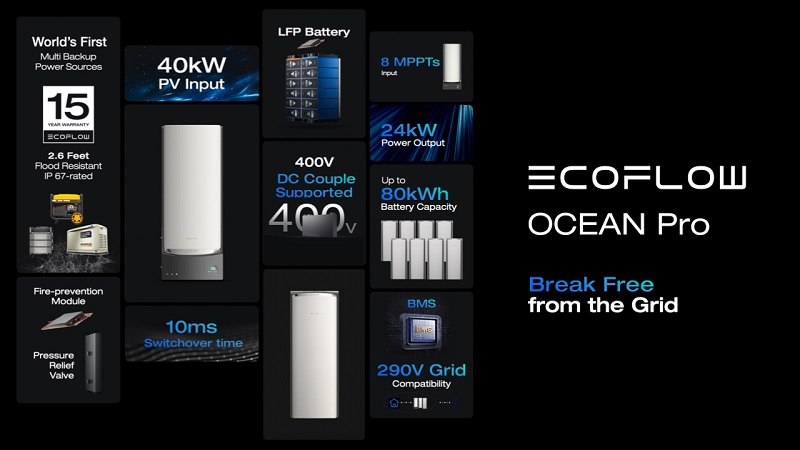
Instead of just paying for energy, the Ocean Pro allows you to control it.
Smart peak shaving: The Ocean Pro integrates directly with your home's circuitry via its smart electrical panel. It then learns your usage and automatically stores cheaper electricity during "off-peak" hours. It then deploys stored energy during expensive afternoon "peak" hours, actively shrinking your PECO bill.
Unmatched output & capacity: Delivering a massive 24kW of continuous power, this system easily runs multiple central AC units, pool pumps, and refrigerators simultaneously. The LFP battery setup starts at a 10kWh base capacity and can be stacked up to an impressive 80kWh, giving you days of full-home backup.
Next-level solar integration: Want to rely less on the traditional power grid? The Ocean Pro hybrid inverter handles up to 40kW of solar input. This allows you to maximize your rooftop's energy harvest, effectively running your home on free, self-generated electricity during the day.
Total remote control: Just like the PECO app gives you control over your payments, the EcoFlow App lets you monitor your home's exact wattage usage in real-time. You get total transparency over where your energy is going, right from your phone.
By treating the Ocean Pro as a smart home upgrade, you transform your household from a passive energy consumer into an active energy manager, meaning fewer surprises when your PECO envelope arrives in the mail.
Get Your Free Home Energy Consultation!
Which energy solution are you interested in?
PECO customer service: when things go wrong
Even with the best preparation, administrative hiccups happen.
A payment might be double-charged, an AutoPay setup might fail, or a check might get lost in the mail. When these issues arise, reaching out to PECO customer service is your best course of action.
For billing disputes, payment issues, or general account inquiries, you can contact their main customer service line at 1-800-494-4000.
Live representatives are generally available Monday through Friday, from 8:00 AM to 5:00 PM. When you call, ensure you have your account number and any relevant payment confirmation numbers ready.
If you notice a payment hasn't reflected on your account after a few days, a quick call to customer service can often place a temporary hold on your account to prevent any unfair late fees while the payment is tracked down.
Signing off
Managing your monthly utilities doesn't have to be a stressful chore. Thanks to the diverse, modern options provided by the company, you can choose a payment method that perfectly aligns with your lifestyle.
Whether you utilize the quick convenience of the mobile app, the security of an online portal, or the reliable simplicity of mailing a check, taking care of your PECO bill pay has never been easier.
To completely remove the mental load of remembering due dates, we highly encourage readers to set up AutoPay. Furthermore, if you are tired of merely paying bills and want to actively reduce them, consider exploring smart home battery solutions like EcoFlow Ocean Pro to take total control of your energy consumption today.
Frequently Asked Questions (FAQs)
Does PECO bill affect credit score?
Generally, no. Utility companies like PECO do not report your standard, on-time monthly payments to the three major credit bureaus (Experian, Equifax, TransUnion). However, if you fall severely behind on your bills and your account gets sent to a collections agency, that collection account will be reported and can significantly damage your credit score.
Is there a grace period for PECO bill pay?
PECO is relatively strict with their due dates. A specific bill is typically considered past due immediately after the listed date passes. This will lead to late payment charges being applied to your next statement. However, formal service disconnection notices are only issued after accounts become significantly and continuously delinquent.
What do I do if I can't afford my PECO bill?
Do not ignore the bill, as this rapidly results in late fees and service disconnections. Instead, be completely proactive and reach out to PECO immediately. You may easily qualify for the Customer Assistance Program, federal grants, or use your online portal to quickly set up a very flexible payment arrangement.
How do I pay a PECO bill for someone else?
The absolute easiest way to pay a family member or friend's bill is by using the online PECO guest pay portal. You do not need their private login password. You simply need their ten digit PECO account number and the zip code of the billing address to complete the transaction.
Where can I pay my PECO bill in cash?
PECO has partnered with hundreds of authorized payment agents across southeastern Pennsylvania. You can pay your bill in cash at the customer service desks of many local Walmarts, regional grocery store chains, and local pharmacies. It is highly recommended that you use the "Find a Payment Location" map tool on PECO’s website to verify the nearest active location before traveling.

