
How Do I Reset A Circuit Breaker Safely? Steps And Troubleshooting
Experiencing a sudden loss of power in one part of your house can be frustrating. If you are standing in the dark asking, "How do I reset a circuit breaker?" you are not alone. Whether you are dealing with an overloaded circuit from too many appliances, a stubborn switch that immediately trips again, or outage worries when relying on an outdated setup instead of a reliable home battery backup with smart electrical panel integration, this troubleshooting walkthrough will guide you through the exact steps to safely restore your electricity.
Electrical Basics: Understanding Your Panel
Before you start flipping switches, it helps to understand what is happening inside that metal box on your wall. The electrical panel is the heart of your home's power system. It divides the main power coming from the utility grid into smaller branch circuits. Each of these branch circuits sends electricity to different rooms and appliances.
Controlling the Current
The primary function of a standard AC breaker is to help control the circuit flow. You can think of electricity like water flowing through a pipe. If too much water tries to push through a small pipe at once, the pipe might burst. Similarly, if a circuit draws more current than it is rated for, the wires can get too hot. When this happens, the switch automatically cuts the power. This action prevents overheating and protects your home's wiring from melting or catching fire.
The Evolution of Panels
Modern home energy systems have evolved far beyond these basic switches. Upgraded setups now offer intelligent ways to track your power. They provide circuit-level monitoring and seamless backup switchovers during grid outages, ensuring your heavy-duty appliances stay on without stressing the system.
The Three Positions
When you look at your panel, you will notice that the physical switches have three distinct positions:
ON: The switch is flipped fully to one side. Power is flowing normally.
OFF: The switch is flipped fully to the opposite side. Power is completely shut down.
TRIPPED: The switch is resting directly in the middle. It feels "spongy" or loose if you touch it. This means the safety mechanism has activated.
Step-by-Step: How to reset a breaker properly
Many homeowners fail at resetting a breaker because they simply try to push the tripped switch directly back to the ON position. This will not work. The internal safety spring needs to be reset first. Follow these exact steps to safely restore your power.
Turn off appliances
First, go back to the room that lost power. Unplug your devices. Turn off the light switches. If you leave everything plugged in, the circuit will experience a massive surge of electricity the second you turn the panel switch back on. This immediate surge will likely cause the switch to trip all over again.
Locate the tripped switch
Open the metal door of your electrical box. Make sure your hands are completely dry. Look up and down the rows of switches. You are looking for the one switch that is resting in the center position. It will look out of alignment with the rest of the row.
Push firmly to OFF
This is the most crucial step for learning how to reset a circuit breaker. You cannot push it straight to ON. You must take your finger and push the tripped switch entirely to the OFF position first. Push it hard until you feel and hear a firm click. That click means the internal safety spring is officially reset and ready to work again.
Switch back to ON
Once the switch is fully locked into the OFF position, you can snap it firmly back to the ON side. You will hear another solid click. At this point, the circuit flow is restored. You can now return to your room and plug your appliances back in one by one.
What to do when a tripped switch won't reset
Sometimes, you follow all the steps above, but the switch instantly snaps back to the middle position. It might even make a loud popping sound or create a small spark. If your switch refuses to stay on, it is warning you about a serious underlying issue. Do not force the switch to stay on.
Continuous Overload
The most common reason a switch will not reset is a continuous overload. This means there are still hidden, heavy appliances drawing too much power on that specific line. Space heaters, hair dryers, and microwaves use a massive amount of electricity. If you forgot to unplug a heavy-duty heater in the corner of the room, the switch will trip again the second you try to restore the power.
Short Circuit
A short circuit is much more dangerous. This occurs when a "hot" electrical wire accidentally touches a "neutral" electrical wire. When these two wires cross, it creates a massive, uncontrolled surge of electricity. The safety switch immediately trips to prevent a massive fire. Short circuits often happen due to chewed wires, damaged appliance cords, or loose connections inside your wall outlets.
Defective Breaker
Just like any other mechanical part, the internal springs and metal contacts inside your panel wear out over time. If your home is older, the switches themselves might simply be broken. A defective unit will cause random trips even under normal, safe electrical loads. When this happens, the physical part must be completely replaced.
Won't the breaker stop tripping? It gets old fast. You really shouldn't have to play a guessing game every time you plug something in. We can help you sort out your home's power limits. Request a consultation to get clear answers from a real expert.
Get Your Free Home Energy Consultation!
Which energy solution are you interested in?
Preventing Future Overloads with Advanced Energy Solutions
Identifying Power-Hungry Appliances
Older homes were simply not built to keep up with modern electrical demands. Thirty years ago, a bedroom only needed enough power for a few lightbulbs and a clock radio. Today, that same bedroom might host a powerful gaming computer, a large television, and a window air conditioning unit. This creates constant strain on standard branch circuits.
To solve this, it is highly recommended to conduct a home energy audit. This process helps you see exactly which devices are straining your system the most.
Upgrading to Smart Circuit Monitoring
Modernizing your electrical box provides incredible visibility into your daily habits. For instance, the EcoFlow OCEAN Smart Electrical Panel 40 completely replaces outdated setups. It offers up to 40 smart circuits for precise, circuit-level monitoring. Through a mobile app, this technology helps homeowners track exactly which appliances are drawing the most power. You can manage your loads efficiently and turn off heavy devices before a switch ever has the chance to trip.

Managing Heavy Loads with Battery Backup
Explain that repeated overloads are a clear sign your home needs proactive energy management rather than just relying on traditional, reactive breaker switches. Instead of constantly worrying about which appliances are running simultaneously to avoid tripping a circuit, integrating a reliable home solar battery like the EcoFlow OCEAN Pro takes the heavy lifting off your main panel:
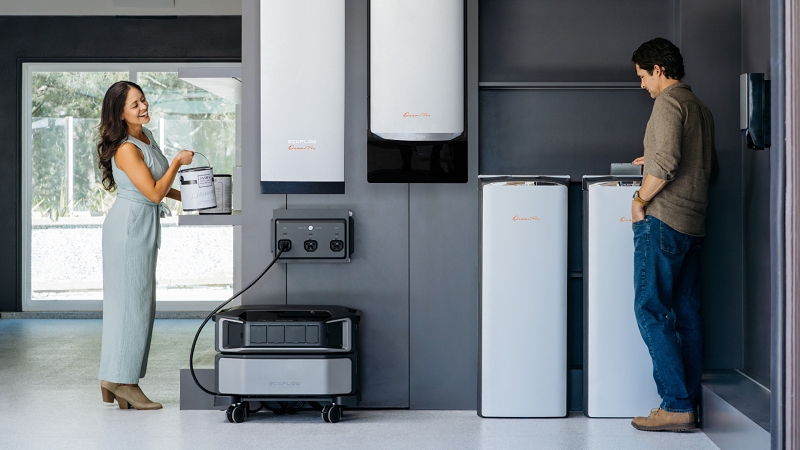
24kW Continuous Output: Provides high-capacity power to effortlessly run demanding appliances, such as dual 5-ton HVAC units, during outages.
Scalable Capacity: Adapts to growing energy needs with a flexible storage range from 10kWh to 80kWh.
Intelligent Load Management: Features an automated mode that shifts heavy usage to off-peak hours to maximize efficiency and prevent circuit overloads.
Differentiating Between Standard, GFCI, and AFCI Switches
Not all switches in your panel are the same. If you look closely at your electrical box, you will likely notice that some switches look slightly different than the rest.
Identifying Breaker Types
Modern electrical boxes include specialized safety devices known as Ground Fault Circuit Interrupter (GFCI) and Arc Fault Circuit Interrupter (AFCI) switches. You can easily spot these because they usually feature a small, built-in "Test" button directly on the switch itself. They also typically have a coiled white wire attached to them inside the panel.
Understanding Specific Trips
Standard switches are designed to protect your home's wiring against general overloads. However, AFCI switches are designed to detect dangerous electrical arcs. An arc happens when electricity jumps through the air between loose wire connections. This jumping creates intense heat and is a leading cause of electrical fires. AFCI switches detect this instantly and cut the power.
GFCIs, on the other hand, protect humans against moisture-related electrical shocks. They monitor the flow of electricity going out and coming back. If even a tiny amount of current leaks out—perhaps through water in a sink—the GFCI shuts the circuit down in a fraction of a second. They are required by building codes in wet areas like kitchens, bathrooms, and garages.
Specialized Troubleshooting
If these specific switches trip frequently and won't stay in the ON position, it means something different than a standard overload. It often points to an active ground fault, such as water exposure near an outlet, or a dangerous arc fault hidden in your wall wiring. This requires a very careful inspection of the specific room's outlets rather than just unplugging a heavy appliance.
Final Thoughts
Learning how do you reset a breaker is an essential skill for any homeowner. By understanding the three positions of your switches and following the proper OFF-then-ON sequence, you can safely restore your power in seconds. However, it is vital to listen to what your panel is telling you. A switch that constantly trips is a clear warning sign of an overloaded circuit or a dangerous short.
As our homes become filled with more technology, traditional panels often struggle to keep up. Upgrading to smart energy management systems provides the visibility and backup power needed to keep your home running smoothly. Remember, while resetting a switch is easy, dealing with complex wiring issues is not. Always prioritize safety, keep a clear 3 feet (0.91 m) space around your panel, and never hesitate to call a certified professional when you feel out of your depth.
FAQs
How do you reset a breaker that has tripped?
To correctly reset it, first locate the tripped switch, which usually rests in the middle position. Push the switch firmly to the "OFF" position until you hear a loud click. Then, push it firmly back to the "ON" position. This correctly resets the internal safety mechanism.
Can a tripped breaker reset itself?
No, a tripped switch cannot reset itself automatically. It is a physical safety mechanism designed to stay in the tripped position until a human manually inspects the circuit, unplugs the overloaded appliances, and physically resets the switch to restore power.
How to reset a circuit breaker without a main switch?
You can safely reset individual branch switches without ever touching the large main switch at the top of your panel. Simply locate the specific smaller switch that has tripped, turn it fully to the "OFF" position, and then snap it back to the "ON" side.
What happens if resetting a breaker doesn't restore power?
If the switch is firmly in the "ON" position but the power remains off, the switch itself may be broken and require replacement. Alternatively, the issue might be a localized power grid outage, or a separate GFCI wall outlet on that specific circuit needs to be reset.
How long do you leave a breaker off to reset it?
You do not need to wait for a long time. Once you push the tripped switch firmly into the "OFF" position and hear the click, you can immediately push it back to the "ON" position. The internal spring resets instantly upon reaching the off position.

