How to Turn Off Solar Panels Safely During Cyclones & Storms
When a cyclone warning hits, most Australians rush to secure outdoor furniture, stock up on supplies, and charge their devices. But if you have solar panels on your roof, there's one more thing you need to know how to safely shut down your system before the storm arrives. After events like Cyclone Alfred, searches for "how to turn off solar panels" spiked across Queensland and New South Wales. It makes sense. People want to protect their homes, their systems, and their families.
This guide covers everything: when to shut down, how to do it step by step, what to do with your battery, and how to safely restart after the storm passes.
Should you turn off solar panels during a cyclone?
Solar panels themselves cannot truly be "turned off." They keep generating electricity whenever sunlight hits them. What you can do is safely isolate the solar system from your home and the grid.
During a cyclone, strong winds, flying debris, flooding, and sudden grid issues may damage electrical equipment. Shutting down the system is mainly about safety, not protecting panel performance.
Grid-connected solar systems usually turn off automatically when the grid goes down. This is a built-in safety feature called anti-islanding. Even so, manually shutting down your system before the storm arrives is the safest choice. It protects your sensitive indoor electrical components from sudden power surges.
It's also important to monitor weather conditions early. Keeping track of your system's performance before the storm helps you prepare in advance instead of reacting at the last minute.
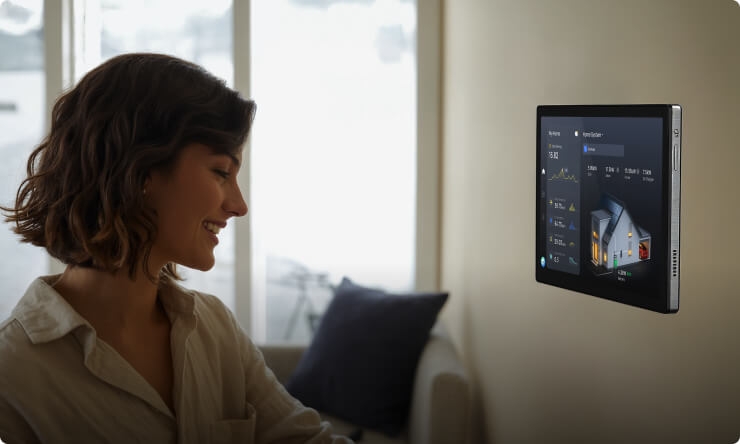
That's exactly what a home energy dashboard like the EcoFlow PowerInsight 2 Monitor is built for. It gives you a live view of your solar generation, battery charge, and grid health, all from your phone. Before a cyclone, visibility matters. You can see exactly how your system is performing, decide when to charge your battery to capacity, and choose the right moment to shut down before conditions make it unsafe to go near your switchboard at all.
When else should you switch off your solar system?
Cyclones are not the only reason to shut down your system. You should also perform a manual shutdown during these common situations:
Panel cleaning: Moisture and electrical current do not mix. Ensure total isolation to eliminate the risk of electric shock when water or cleaning tools come into contact with the panels.
Scheduled maintenance: Electricians and installers often require the system to be fully isolated before inspections or repair work begins.
System upgrades. Always isolate the power when adding new panels, swapping out your inverter, or installing a home battery.
Extreme weather events: Beyond cyclones, this includes severe thunderstorms, hail warnings, or any event where your switchboard could be exposed to water.
Prolonged travel or vacancy: Completely disconnecting the panels and batteries limits your exposure to ongoing risks like equipment faults or overheating while the home is unattended.
How to safely shut down a home solar PV system
Shutting down your solar system is straightforward if you follow the right order. Always check the shutdown label on your inverter first. Here's the safest way to do it:
Step 1: Turn off the solar supply main switch
Go to your main switchboard. Find the switch labeled "Solar Supply Main Switch" and turn it OFF. This stops power from moving between your inverter and the house.
Step 2: Turn off the inverter
Find the AC isolator switch near your inverter. Turn it off. Then press the inverter's power button. The screen should go dark.
Step 3: Turn off the DC isolator
Locate the switch labeled "Solar DC Isolator," which is usually next to or inside the inverter. Flick this switch to the OFF position. This safely cuts off the direct current (DC) coming down from your roof panels.
Step 4: Verify shutdown
Look at the screen or status lights on your inverter. The screen should go completely dark, and all lights should turn off. This confirms that the system is fully isolated.
Solar shutdown safety precautions
Shutting down a solar system is usually simple, but safety should always come first. Solar equipment can still carry live electricity even after parts of the system are isolated. Follow these precautions carefully before touching any solar components.
Never climb on the roof during a storm: Strong winds and rain make roofs extremely dangerous. Stay on the ground and avoid any roof access until the weather clears.
Always treat solar panels as live: Solar panels keep producing electricity whenever there is sunlight. Always assume they are live and dangerous, even if the system is switched off.
Keep your hands dry when handling electrical components: Wet hands increase the risk of electric shock. Make sure your hands and the area around the switches are completely dry before touching anything.
Check your system's shutdown label first: Every solar system is slightly different. Read the shutdown instructions on your inverter label before turning anything off.
Call your installer if you're unsure: If you feel confused or can't find the switches, contact your solar installer immediately. It's better to be safe than risk an accident.
Never approach a damaged or flooded system: Stay clear of any solar equipment that looks damaged or is touching water. Flooded systems can be deadly.
Do not restart without inspecting first: Always check for visible damage after the storm before turning your system back on. Only restart if everything looks safe.
What happens when you turn off your solar system?
Shutting down your solar system safely isolates it from your home and the electricity grid. While the system stops supplying usable power, some components still remain electrically active.
Panels stay alive: The photovoltaic cells continue to absorb sunlight and generate voltage. However, the open circuit blocks the current, so the energy is safely released as a tiny bit of heat.
No solar power to the home: Your appliances will stop using solar energy immediately. Instead, your home will pull power exclusively from the local electricity grid.
Battery stops charging from solar: If you have a storage system, it will no longer receive a charge from the panels. Depending on how it's configured, it may draw from the grid or simply hold its current charge until the system restarts.
Feed-in to the grid stops: Any excess power generation stops, meaning you will not earn net metering or feed-in tariff credits while the system is off.
The inverter goes dark: The inverter usually turns off completely or enters standby mode. Its screen and indicator lights may go dark during the shutdown process.
No long-term harm: Shutting down your system for a short time will not damage your equipment. It is completely safe to do for storms, maintenance, or holidays.
How battery storage can help during cyclones and blackouts
Shutting down your solar system before a cyclone is a safe move. But it does leave you without solar generation, sometimes for hours, sometimes longer. If the grid goes down, too, you're left with nothing unless you prepare ahead.
A good battery will keep your home running when the grid goes down. It offers backup power when you need it most. Preparing for the storm by charging the battery with solar panels is a good idea. This way, you store free power for emergencies rather than relying solely on the grid.
During an outage, backup power can support important household essentials such as:
Fridges and freezers to keep food safe
Wi-Fi routers for communication and updates
Medical devices that require continuous electricity
Lighting for safety and visibility at night
A battery that can handle all of these reliably, without manual switching, is what genuine energy resilience looks like.
The EcoFlow OCEAN 2 Plus Single-Phase is built for exactly this. When the grid goes down, it switches to backup power in 0 ms, no flicker, no interruption, nothing to manually trigger. Each battery pack holds 5kWh of LFP storage. The system carries an IP66 rating, meaning it's rated for up to 72 hours of water immersion on the bottom battery module, no small thing when a cyclone brings serious flooding risk. And with a 15-year warranty, it's a long-term investment in your home's resilience, not just a storm prep purchase.
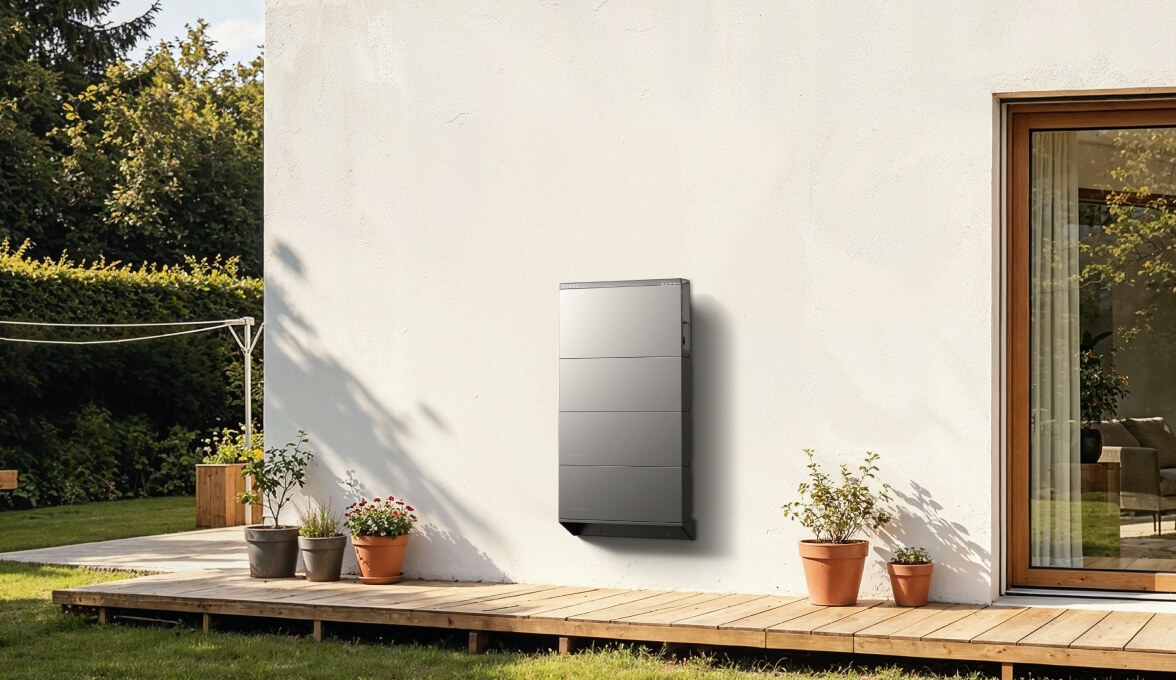
It connects seamlessly with the EcoFlow PowerInsight 2 Monitor too, so you can monitor your battery charge level in real time, right up until the moment you decide to shut the solar system down.
Ready to protect your home during cyclones and blackouts? Book a free EcoFlow consultation today and discover the best battery solution for your home.
Schedule Your Free Consultation Today!
What kind of product or solution are you interested in?
How to restart your solar panels after a cyclone
Once the storm has passed and it's safe, you can restart your solar system. Follow these steps in the correct order:
Step 1: Inspect for damage before restarting
Visually inspect your solar panels, wiring and mounting from the ground. Inspect for any cracks, loose parts, debris, or water damage. Do not proceed if you see anything wrong. If damage is visible, contact your installer first.
Step 2: Turn the DC Isolator back on
Locate the DC isolator switch near the inverter. Flip it to the ON position. This allows power from the panels to flow again.
Step 3: Turn the Inverter back on
Switch on your inverter using the button or AC isolator. Wait for it to boot up. The display should light up and start checking the system.
Step 4: Turn the Solar Supply Main Switch back on
Go to your main switchboard and turn the "Solar Supply Main Switch" back to ON. This reconnects your system to the home and the grid.
Step 5: Confirm the system is running normally
Wait a few minutes. Check the inverter screen and your monitoring app. You should see solar production. Make sure there are no error messages. If everything looks good, your system is back online.
Conclusion
Modern solar systems are designed to withstand Australia's harsh climate, including strong winds and storms. Still, in cyclones and severe weather events, safety should always be the priority. Knowing how to safely turn off solar panels and following the correct shutdown procedures and manufacturer guidance can reduce electrical hazards and equipment damage. If in doubt, seek professional advice from a licensed installer or electrician. Homeowners also get peace of mind by preparing ahead of cyclone season. Innovative monitoring solutions, such as the EcoFlow PowerInsight 2 Monitor, and dependable backup battery systems, such as the OCEAN 2 Plus Single-phase battery, can enhance household energy resilience and help maintain power to critical appliances during unforeseen blackouts and extreme weather events.
FAQs
Should I turn off my solar panels during a cyclone?
Yes, it's recommended during severe cyclones for added safety. While most systems are built tough, shutting down helps protect against risks such as flying debris, flooding, and power surges. Always follow your shutdown label and call a professional if unsure.
Can panels still generate power when the system is "off"?
Yes, solar panels continue to generate power whenever sunlight hits them. However, when the system is switched off, the electricity is isolated and doesn't flow anywhere. It simply turns into a small amount of heat instead.
What happens if I forget to switch off my system?
Modern solar systems usually shut down automatically during grid issues or extreme weather. However, leaving it active increases the risk of equipment damage from sudden, intense power grid spikes.
How long does it take to restart a solar system after a cyclone?
It usually takes 5 to 10 minutes to restart once the storm has passed. Turn the switches back on in the correct order after inspecting for damage. If everything looks fine, your system should begin producing power again quickly.
What happens if I turn off the solar switches in the wrong order?
Turning them off out of order can cause a small electrical arc inside the switches. Doing this repeatedly wears out the components quickly and can eventually cause serious hardware damage.